
Operational problem
Bring the property experience to the curb without depending on a visitor’s device.
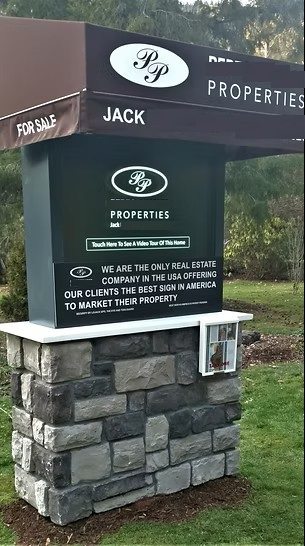
The client needed a standalone public interface at the property sign. It had to play a property tour, collect visitor details and requests, communicate over cellular service, and remain usable in a field installation with battery-backed power.
Users and constraints
A public-facing Windows system inside a supplier-manufactured enclosure.
- Prospective buyers needed a simple touch-first experience with no Windows desktop exposed.
- A realtor needed request details delivered without remaining at the property.
- Wired data was not the practical path, so content and request delivery used cellular connectivity.
- The display and capacitive touch layer sat behind a protective acrylic front panel.
- Rechargeable 12-volt power supported field use, with optional 120-volt input for charging or connected operation.
- Internal components needed a repeatable, serviceable arrangement across three matching units.
How I framed the problem
Define the visitor path, then choose the hardware around it.
The core workflow was deliberately short: approach the interface, view a full-screen tour, enter contact and request information, submit it over the cellular path, and notify the realtor by email. That path drove every important requirement—display size, touch behavior, shell control, communications, power, and service access.
I specified and sourced supplier-manufactured enclosures and components, selected how the embedded computer, display, touch layer, cellular hardware, and power system would work together, and performed the complete internal assembly and integration.
What the system enabled
A self-contained visitor experience designed for field use.
Touch-first tour
A dedicated Windows application presented the property tour and request workflow without exposing the normal desktop.
Independent connectivity
Cellular service let each unit deliver content and submit visitor requests without relying on property networking.
Field-ready operation
Integrated display, touch, embedded computing, rechargeable power, and a serviceable enclosure supported outdoor deployment.
What I owned
Specified, sourced, assembled, wired, programmed, integrated, deployed, and supported.
How I tested it
Validate the full path, not only the screen.
Field readiness required the touch interface, LVDS display, Windows shell replacement, tour playback, visitor capture, cellular submission, email delivery, charging path, and battery-backed operation to work as one system. Ongoing support after installation also revealed what mattered for serviceability and confirmed the value of keeping all three units on one repeatable architecture.
Result
Three repeatable units deployed around 2019 and supported in field service.
I specified, assembled, integrated, and deployed three cellular virtual-tour kiosks, then supported them through at least one year of field service. The result was a completed hardware-and-software product operating in its intended environment.
What I learned
Design the service path as carefully as the visitor path.
The repeatable internal layout and controlled Windows shell reduced avoidable variation. A future iteration would add service diagnostics, component-health reporting, power-state logging, content-version checks, and automated end-to-end request tests while preserving the simple public interaction.